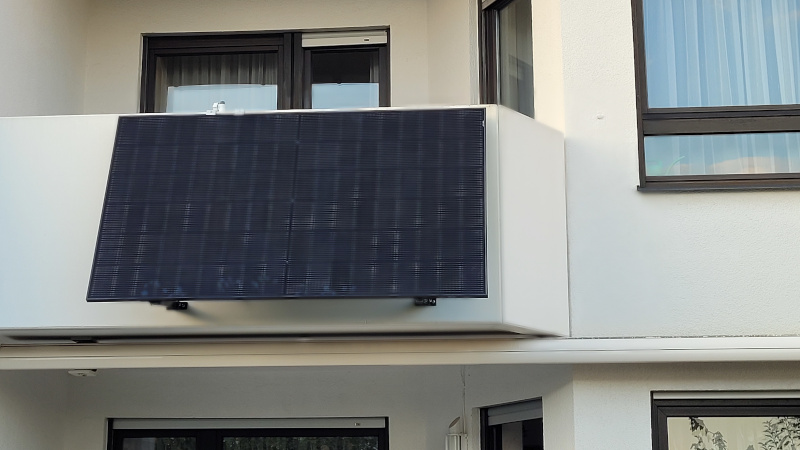
For quite some time I was planning to setup a small (one or two panels) solar power system to at least collect some of the energy I burn for my computer equipment which operates 24/7. I finally made the step, bought a set for a max power of 800W and installed it.
The delay was mainly driven by the shape of our house. This sounds strange, but with a width of 6 meters one would normally be able to attach two modules – each at 1,70 meters – side-by-side. The problem: the house does not have 3,4 meters of flat surface. So I went through a few options. Some of them were dismissed by my wife for aesthetic reasons, others just made no sense for the shadow the house and the neighbors houses will drop on the panels. Our roof on the south-side has a dormer which covers most of the space and leaves no spot for the panel. Attaching it on top of the dormer is not an option because I don’t want to drill into the roof covering which seems to be made of several layers of roofing felt.
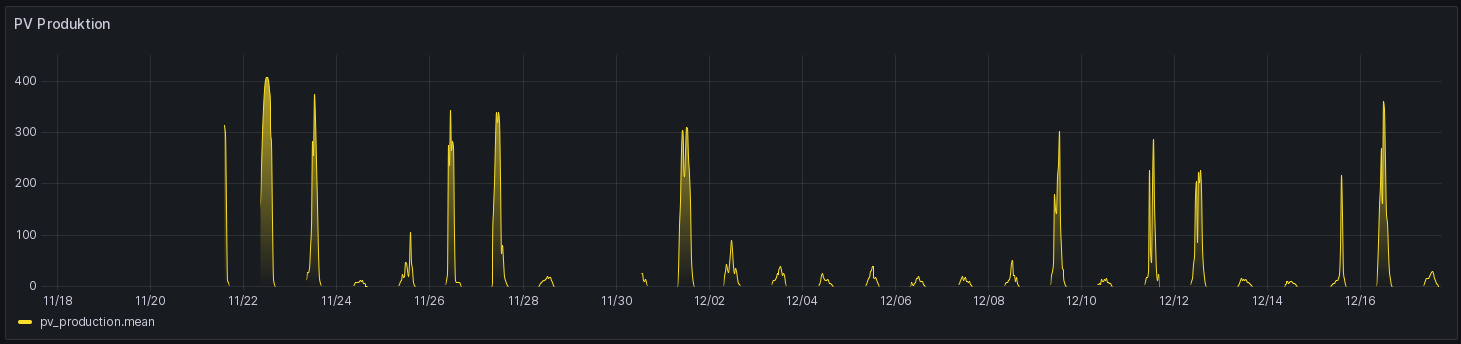
Finally, I attached one of the two panels to the balcony. Drilling eight holes into the concrete and fixing the 22kg panel to the balcony railing, hooked up the inverter and plugged it in. Now whenever the sun is shining I produce a max of 400W while my steady consumption is somewhere between 180W and 300W depending how many computer and other accessories are powered.
The set I bought has an inverter that can communicate via WiFi. For that matter it has an access point by default which you can access from your mobile by using a specific app. Since the app first wants to check some stuff on the internet, you need to change the WiFi hot spot whenever you want to run the app. No way just to verify what the system is doing. The other option they support is to configure the inverter so that it opens a connection to the manufacturers server and use the mobile which will then present the data of the digital twin. No way for me, because this is way too insecure and is not a sovereign solution since it is based on a man in the middle who may control at will if I can talk to my inverter or not.
One of my colleagues told me about a project on github called hoymiles-wifi. It’s a python based library and command line tool that is capable of talking to the Hoymiles inverter via the protobuf based messages. That seemed like a valuable piece of software. So I installed it inside a temporary VM and setup the necessary WiFi connection to the inverter. First, I tried it in a late evening when I noticed, that the inverter’s AP is powered by the DC side of the inverter and without the sun there’s no communication. So time for some rest and a fresh restart after sunrise.
The next morning I played around with the CLI version of hoymiles-wifi and thought about a script that reads the data from the inverter and sticks it into my already existing MQTT broker. But I have no idea about Python and the many libraries that are available. Also, I wanted to run this code inside a docker container on my RasPi already running the containers for the MQTT broker, NodeRed for the transformation, influxdb for storage and Grafana for the visual part. It certainly has the power to host another container for the solar data.
That’s the time when I turned to AmazonQ (now Kiro) to use a few prompts to what I want to do and after a few rounds of testing various versions and additional requirements I had a working script that was even capable of handling the power outage of the inverter over night and stop reporting data that does not change.
Another benefit of this solution is the fact, that I get actual data every 10 seconds. Reading the hoymiles-wifi documentation and other material on the net I stumbled over descriptions that mention that one could only send a request for actual data every 35+ seconds or one would get the previous set of data again. This is apparently only the case, when the inverter’s wifi component is running in client mode and it is reporting data to its chinese home base. Since I run it in access point mode I am apparently not affected by this :-).